This is useful for, for example, triggering different weather conditions. In this example I’ll add different types of snow.
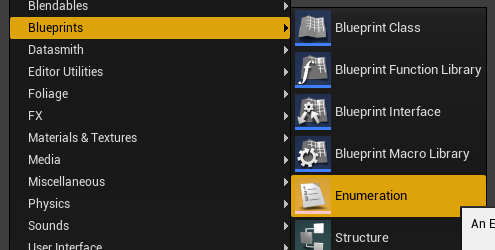
- Add a list of options to choose from – Create an ENUM structure (Blueprint > Enum), call it ENUM_RainTypes and add some options such as None, Light, Heavy
- Make a trigger blueprint that can be reused throughout the level – Create an Actor Blueprint and name it BP_RainTrigger and add a trigger box. Set it as the root component.
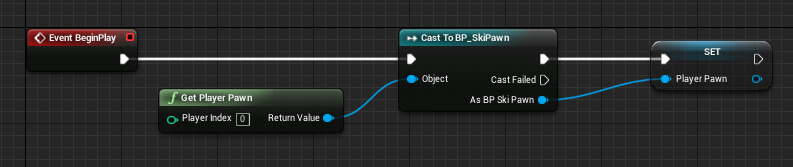
- Get the player pawn – In the BP_RainTrigger Event Graph, use the BeginPlay event to exec a Cast to on your player pawn. Use Get Player Pawn node to get the current player pawn and set the pawn to a variable for use later.
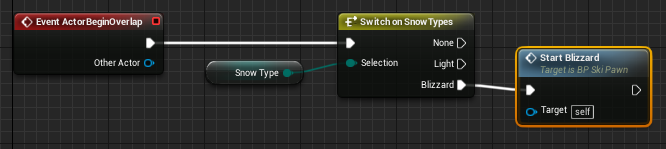
- Setup the overlap trigger event – In BP_RainTrigger Event Graph still, use the ActorBeginOverlap event to exec a Switch on ENUM_RainTypes. Add a variable of type ENUM_RainTypes (this will allow users to select the rain type for each BP_RainTrigger instance in the level). Plug this into the ENUM_RainTypes Selection pin.
- You can now use the execution pins from the ENUM_RainTypes node to trigger events in the player pawn blueprint (these events will need to be setup separately).
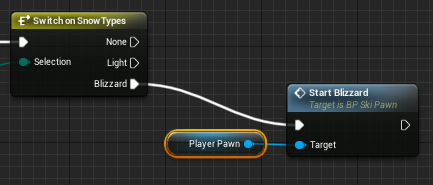
- Plug in the player pawn variable we created before to access the event in the other blueprint.
Leave a Reply